> ## Documentation Index
> Fetch the complete documentation index at: https://docs.genlook.app/docs/llms.txt
> Use this file to discover all available pages before exploring further.
# Integrations
> Connect Genlook try-on activity with your favorite CRM, email, and marketing tools through Shopify.
Genlook is built directly on top of Shopify's native customer data model. Whenever a shopper interacts with the virtual try-on widget, Genlook saves their activity straight to their **Shopify customer profile**.
Because of this, any tool you already use that syncs with Shopify customers (Klaviyo, Omnisend, Mailchimp, Meta or Google Ads) can instantly leverage this try-on data without requiring any additional setup or custom integrations.
## The foundation: your Shopify customer segment
When you install the app, Genlook automatically creates a new customer segment in Shopify called **"Virtual Try-On Users by Genlook"**.
You'll find it in your Shopify admin under **Customers → Segments**. It uses a simple query:
```
customer_tags CONTAINS 'genlook-user'
```
Any shopper who uses the try-on feature while logged in, or who provides their email through the widget, gets tagged with `genlook-user` and is automatically added to this segment.
If a shopper tries on an item anonymously (they aren't logged in and haven't provided an email), they **won't** be added to the segment. We wait until they identify themselves before we attach activity to a customer profile.
## How Genlook updates customer profiles
Along with the general `genlook-user` tag, Genlook enriches each customer's profile with their specific try-on history:
We add a specific tag for each variant a customer tries on, formatted as `genlook-try-{productId}-{variantId}`. This is perfect for creating highly targeted segments (like "customers who tried on the leather jacket").
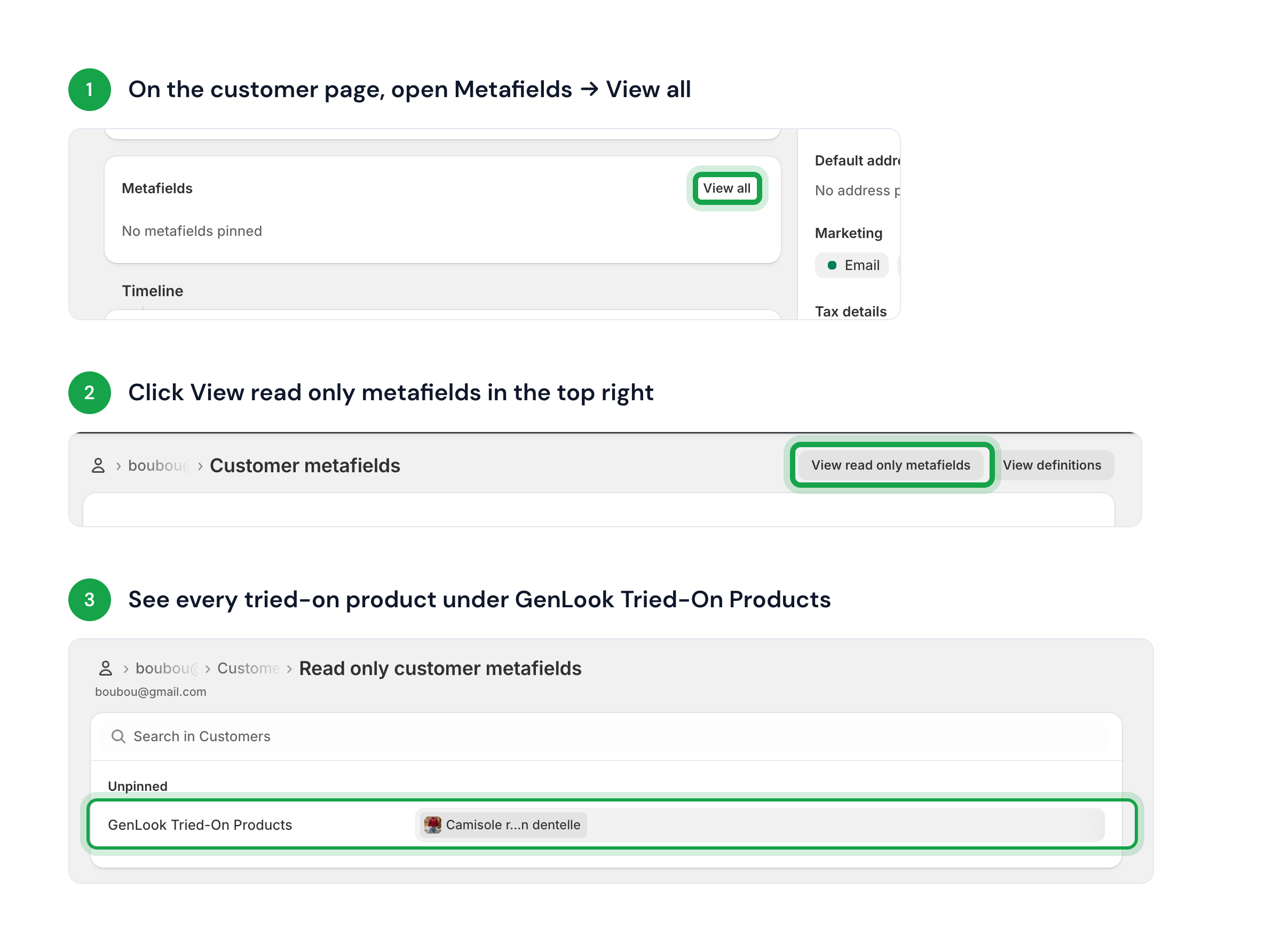
We store a `list.product_reference` metafield (`$app.genlook_tried_on_products`) that keeps a running list of every product a customer has tried. These appear natively as clickable product links right in the Shopify admin.
This data stays in sync automatically:
* **Instantly** whenever a logged-in shopper tries something on.
* **Retroactively** when an anonymous visitor identifies themselves (by logging in or submitting an email). As soon as we know who they are, we backfill their entire previous try-on history to their Shopify profile.
 ## Connect with your favorite tools
Since Genlook writes directly to Shopify, any integration that reads your Shopify customer data will automatically pick up these insights. Here are a few ways merchants use this data:
* **Klaviyo**: Connect directly via OAuth to stream **Tried On Product** events into Klaviyo. See the [Klaviyo guide](/docs/virtual-tryon/integrations/klaviyo).
* **Email & SMS (Omnisend, Mailchimp)**: Sync the "Virtual Try-On Users by Genlook" segment to create a dedicated list, or use product-specific tags to trigger personalized follow-up flows.
* **Ad Audiences (Meta, Google, TikTok)**: Export your try-on segment as a custom audience to retarget high-intent shoppers, or use it to build powerful lookalike audiences.
* **Reviews & Loyalty (Yotpo, Smile, LoyaltyLion)**: Use try-on tags to trigger targeted review requests or reward customers with loyalty points for trying on new collections.
* **Analytics (Triple Whale, Lifetimely)**: Combine try-on tags and metafields with your order data to measure how virtual try-on drives conversions.
## Order attribution
When a shopper who used Genlook completes checkout, Genlook tags the Shopify order:
* **Tag** `genlook-order`: the order came from a try-on user.
* **Metafield** `genlook_try_on_count`: lifetime try-on count for that shopper at order time (integer).
When the shopper has already tried on, cart attribution adds a note attribute `_genlook_try_on_count` (best-effort; the webhook uses your Genlook database as the source of truth).
## Connect with your favorite tools
Since Genlook writes directly to Shopify, any integration that reads your Shopify customer data will automatically pick up these insights. Here are a few ways merchants use this data:
* **Klaviyo**: Connect directly via OAuth to stream **Tried On Product** events into Klaviyo. See the [Klaviyo guide](/docs/virtual-tryon/integrations/klaviyo).
* **Email & SMS (Omnisend, Mailchimp)**: Sync the "Virtual Try-On Users by Genlook" segment to create a dedicated list, or use product-specific tags to trigger personalized follow-up flows.
* **Ad Audiences (Meta, Google, TikTok)**: Export your try-on segment as a custom audience to retarget high-intent shoppers, or use it to build powerful lookalike audiences.
* **Reviews & Loyalty (Yotpo, Smile, LoyaltyLion)**: Use try-on tags to trigger targeted review requests or reward customers with loyalty points for trying on new collections.
* **Analytics (Triple Whale, Lifetimely)**: Combine try-on tags and metafields with your order data to measure how virtual try-on drives conversions.
## Order attribution
When a shopper who used Genlook completes checkout, Genlook tags the Shopify order:
* **Tag** `genlook-order`: the order came from a try-on user.
* **Metafield** `genlook_try_on_count`: lifetime try-on count for that shopper at order time (integer).
When the shopper has already tried on, cart attribution adds a note attribute `_genlook_try_on_count` (best-effort; the webhook uses your Genlook database as the source of truth).