
 Shopify
 WooCommerce
 API
APIVirtual try-on for wigs & hair.
Wig shoppers want to know whether a style will look natural on them. Genlook adds a try-on button to your product pages, so shoppers can see your lace fronts and full wigs on their own face in under 10 seconds, before they order.
Free plan, no card needed


 8.2 s
8.2 sFree plan, no card needed
Used by 900+ fashion stores








Example wig try-ons
One shopper photo tried with four different styles. Each result is shown next to the product photo it was made from.



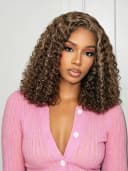



Wig shoppers can't see how a style frames their own face
Buying a wig is a personal, considered purchase, and shoppers make it from a photo of someone else's face. Good photography can't show how the style will look on the buyer. Many carts are left, and some orders come back.
- The model's features and skin tone differ from the shopper's
- Whether a wig looks natural depends on the person wearing it
- Genlook shows the style on the shopper's own face before they order
 Genlook
900+
fashion stores use Genlook
5.0
rating on the Shopify App Store
8.2s
median time per try-on
Bobs to body waves
wig lengths, textures and colors supported
Try-on for lace fronts, bobs, curls and hairpieces
Lace fronts, hairpieces and jerry curls each have their own texture and shape. Genlook shows each style on the shopper's face.
How Genlook shows wigs on the shopper's face
Shows a natural-looking hairline
The lace front is shown as a soft hairline on the shopper's forehead.
Blends with skin tone
Shading is adjusted to the shopper's skin tone and the lighting of their photo.
Keeps the texture and color
Tight curls stay tight, body waves stay soft, and the color follows the product photo.
Works for many hair products
Lace fronts, full wigs, hairpieces and extensions are all handled from the product image.
Where stores use try-on
Product pages
Shoppers see how a lace front frames their face, next to the add-to-cart button.
Style switching
Shoppers reuse the same selfie to try different lengths and colors across the collection.
New-style launches
Link launch emails to product pages with try-on, so shoppers can see new styles on themselves.
Why wig shoppers need to see a style on their own face
Wigs are expensive, personal purchases, and how they look depends on the wearer's face and skin tone. Broad fashion surveys already show 38% of shoppers struggling to find styles that fit them. With hair, a photo of a model tells the shopper even less, because whether a style looks natural depends on the person wearing it.
A selfie-based try-on lets shoppers make that judgment on the product page. They see the length, color and face framing on their own features, and reuse one photo across the whole collection. The wig try-on guide covers the setup in detail, and the live demo shows how hairlines and textures render.
Frequently asked questions
Does the try-on work for lace-front wigs?
Yes. Genlook shows the lace front as a soft transition at the hairline.
Does the result match different skin tones?
Genlook adjusts the blending to the skin tone in the shopper's photo, so the wig looks like it is worn by the shopper.
What if the shopper has long hair underneath?
The wig is shown over the shopper's existing hair. For the clearest result, add a tip on your product page: "Tie hair back for best try-on results."
Do color variants each need their own photo?
Yes. One clear photo per colorway gives the most accurate result. Genlook reads the length, texture and color from the image.
Are shoppers' selfies private?
Yes. Photos are encrypted in transit and at rest, never used to train AI models, and deleted automatically after 7 days.
What does it cost?
The Free plan includes 10 try-ons a month, and no card is required. Paid plans include more try-ons each month.
Available on
Or use the Try-On API for a custom store.
 PrestaShop module