
 Shopify
 WooCommerce
BANUBA ALTERNATIVE
Genlook vs. Banuba
Banuba runs live AR try-on for makeup, glasses and lenses, priced from $319 a month. Genlook generates try-ons from the product photos you already have, clothing included, and starts free. Here is how the two compare.
01 — The short verdict
Different catalogs, different tools.
Banuba is beauty-first AR from a long-time AR engine vendor. Genlook is generative try-on built around fashion catalogs. Which one fits depends on what you sell.
Banuba
Built for beauty AR
- Real-time AR mirror for makeup, glasses, contact lenses and hair color
- Widget available in 9 languages
- No clothing or apparel try-on at all
- Paid plans start at $319/mo; the free tier only works on development stores
- Each SKU needs digitizing in the admin panel before try-on works
Genlook
Built around fashion catalogs
- Free plan that runs on live stores
- Clothing at the core, plus glasses, lenses, jewelry, hats and wigs
- Works from your existing photos, no per-SKU digitization
- Email capture and funnel analytics built in
02 — Feature by feature
Where each app stands.
Checked against both App Store listings.
Pricing
Free plan, paid from $19.99/mo
From $319/mo, free tier for dev stores only
Clothing try-on
Core of the product
Not supported
Try-on method
Generative AI from an uploaded photo
Live AR camera overlay
Product setup
Your existing product photos
Per-SKU digitization in the admin panel
Categories
Clothing, glasses, lenses, hats, wigs, jewelry
Makeup, glasses, lenses, hair color
Languages
50+ languages, auto-detected
9 languages
Lead capture
Built in, configurable triggers
Not listed
Track record
5.0 stars, Built for Shopify
4.3 stars, Built for Shopify
The part you can't compare on paper.
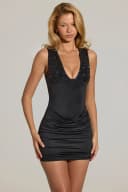
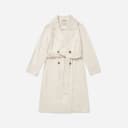
Four generations from the Genlook engine on real product photos.










03 — The real difference
Where the two overlap, and where they don't
Banuba spent a decade building face-tracking AR before packaging it as a Shopify app, and it shows in the right places: the makeup mirror runs in real time, rendering is tuned across skin tones, and glasses and contact lenses sit convincingly on a live camera feed. If your store sells cosmetics, that is exactly the machinery you want, and Genlook does not compete there.
The trade-offs are scale and scope. Banuba's plans start at $319 per month with 10,000 try-ons included, sized for high-traffic beauty brands rather than growing stores, and the free tier only runs on development stores. Every SKU needs digitizing in the admin panel before shoppers can try it. And there is no clothing try-on at all: the engine tracks faces, not bodies.
How Genlook handles it
Genlook starts from the opposite end. The engine generates a still image of the shopper wearing the product from an uploaded photo, which is what makes garments work: drape, fit and length render naturally without any 3D pipeline. The same approach covers glasses, colored lenses, hats, wigs and jewelry from the photos already in your catalog, and the free plan runs on a live store.
If you sell makeup, Banuba is the purpose-built choice. If you sell clothing, or you want try-on across a mixed fashion catalog without digitizing every SKU, that is the lane Genlook is built for.
04 — In practice
What Genlook is tuned for.
Your photos as they are
No digitization step, no 3D assets. The engine renders products from the photos already in your catalog.
Add-to-cart
The widget flow ends at the cart. Each step is A/B tested against add-to-cart rate.
Every shopper's language
The widget detects each shopper's language and renders in it, with more than 50 languages covered. No setup.
Email capture
The email ask appears during the try-on. You choose when it triggers and what it says.
05 — Switching
From Banuba to Genlook, step by step.
Install Genlook
From the Shopify App Store. The free plan needs no card and runs on your live store.
Swap the app embeds
In the theme editor, turn Banuba's embed off and Genlook's on. No code changes.
Check the funnel
Try-ons, captured emails and add-to-cart events report from the first session.
06 — Genlook Pricing
Monthly plans with try-ons included.
The Free plan includes 10 try-ons a month and needs no card. Paid plans include more try-ons, and extra ones are billed individually.
FREE
$0
10 try-ons / month
no extra usage on the Free plan
- –10 monthly try-on included
- –Customizable try-on widget
STARTER
$19.99
/mo100 try-ons / month
+ $0.17 per extra try-on
- –100 monthly try-on included
- –Additional try-ons at $0.17/tryon
- –Analytics Dashboard
- –Customers Email Collection
- –Standard Support
GROWTH
MOST POPULAR$29
/mo250 try-ons / month
+ $0.12 per extra try-on
- –250 monthly try-on included
- –Additional try-ons at $0.12/tryon
- –Advanced Analytics
- –Customers Email Collection
- –Standard Support
PRO
$99
/mo1,000 try-ons / month
+ $0.10 per extra try-on
- –1000 monthly generations included
- –Additional try-ons at $0.10/tryon
- –Advanced Analytics
- –Customers Email Collection
- –Remove genlook branding
- –VIP Support
Used by 900+ fashion stores
★★★★★5.0on the Shopify App Store







07 — FAQ
Questions, answered.
Does Banuba support clothing try-on?↓
No. Banuba's Shopify app covers makeup, glasses, contact lenses and hair color through live AR face tracking. It does not render garments. Clothing try-on is the core of what Genlook does.
Can Genlook do makeup like Banuba?↓
No. Genlook does not render makeup. It covers clothing first, plus glasses, colored contact lenses, hats, wigs and jewelry, all generated from photos rather than a live camera feed.
Why is Banuba so much more expensive?↓
Banuba's plans are sized for volume: the $319 per month Basic plan includes 10,000 monthly try-ons, scaling to $1,599 for 70,000. There is a 14-day trial, but the free tier only works on development stores. Genlook starts with a free plan on live stores and paid plans from $19.99 per month.
Do I need to digitize my products for Genlook?↓
No. Genlook works with your standard 2D product photography, with no per-SKU setup in an admin panel. Enable a product and the try-on button is live.
Will the widget slow my product pages?↓
No. Genlook loads after your page renders and adds nothing to your theme code, so your Core Web Vitals stay where they are.
Further reading
What is virtual try-on? →ROI calculator →Try it on your own products.
Install Genlook free on your Shopify store and compare it with your current setup on a theme preview.