
 Shopify
 WooCommerce
TRYPOINT ALTERNATIVE
Genlook vs. TryPoint
TryPoint and Genlook sit close on paper: same $19.99 entry plan, both rated 5.0, both Built for Shopify. TryPoint points try-ons at content and UGC. Genlook points them at add-to-cart, in the shopper's own language. Here is the detail.
01 — The short verdict
Content, or conversion.
Both apps generate AI try-ons from a shopper photo at the same entry price. They differ in what the try-on is for afterwards.
TryPoint
Built around content
- Permission-based reuse of try-ons as UGC social proof
- Shoppable videos through its sibling app, VideoPoint
- Email capture syncing to Klaviyo, Mailchimp, Omnisend and Yotpo
- Widget listed in English only
- Free plan is 20 try-ons once, not monthly
Genlook
Built around the purchase
- Widget auto-translates into 50+ languages
- Free plan renews with 10 try-ons every month
- Funnel analytics, impression through add-to-cart
- 9.3s median generation, A/B tested for add-to-cart
02 — Feature by feature
Where each app stands.
Checked against both App Store listings.
Pricing
Free 10 try-ons monthly, then $19.99/mo for 100
Free 20 try-ons once, then $19.99/mo for 100
Overage
$0.17 on the entry plan
$0.19 on the entry plan, $0.29 pay-as-you-go
Languages
50+ languages, auto-detected
English, per its listing
Lead capture
Built in, syncs to Klaviyo
Built in, syncs to Klaviyo, Mailchimp, Omnisend, Yotpo
UGC reuse
Share links included
Permission-based UGC pipeline
Shoppable video
Not offered
Via the separate VideoPoint app
Analytics
Full funnel, impression to add-to-cart
Try-on gallery in the Shopify admin
Track record
5.0 stars, Built for Shopify, live since Sept 2025
5.0 stars, Built for Shopify, live since Dec 2025
The part you can't compare on paper.
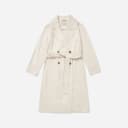
Four generations from the Genlook engine on real product photos.











03 — The real difference
What a try-on is for
TryPoint's distinctive idea is that a try-on is content. When a shopper generates a good result, TryPoint can ask their permission to reuse it as UGC social proof, and through VideoPoint, the sibling app from the same team, the best try-ons become shoppable videos. If your marketing runs on user content, that loop is genuinely clever, with two caveats: the video half needs the second app and its own subscription, and the widget itself ships in English only.
How Genlook handles it
Genlook's idea is that a try-on is a step toward a cart. The flow from button to result is A/B tested against add-to-cart rate, generations land in 9.3 seconds median, and the widget renders in the shopper's own language, more than 50 covered. Every step reports to a funnel you can read: impressions, opens, uploads, generations, add-to-carts. Shoppers get share links for their results, and the email ask lands during the try-on, syncing to Klaviyo.
The two apps agree on price and pedigree, so the choice is really about your next bottleneck. If you need more content, TryPoint's UGC loop earns its place. If you need more conversions, especially from international traffic, that is the lane Genlook is built for.
04 — In practice
What Genlook is tuned for.
Add-to-cart
The widget flow ends at the cart. Each step is A/B tested against add-to-cart rate.
Email capture
The email ask appears during the try-on. You choose when it triggers and what it says.
Every shopper's language
The widget detects each shopper's language and renders in it, with more than 50 languages covered. No setup.
Funnel analytics
Impressions, opens, uploads, generations and add-to-cart events, reported in the dashboard.
05 — Switching
From TryPoint to Genlook, step by step.
Install Genlook
From the Shopify App Store. The free plan needs no card.
Swap the app embeds
In the theme editor, turn TryPoint's embed off and Genlook's on. No code changes.
Check the funnel
Try-ons, captured emails and add-to-cart events report from the first session.
06 — Genlook Pricing
Monthly plans with try-ons included.
The Free plan includes 10 try-ons a month and needs no card. Paid plans include more try-ons, and extra ones are billed individually.
FREE
$0
10 try-ons / month
no extra usage on the Free plan
- –10 monthly try-on included
- –Customizable try-on widget
STARTER
$19.99
/mo100 try-ons / month
+ $0.17 per extra try-on
- –100 monthly try-on included
- –Additional try-ons at $0.17/tryon
- –Analytics Dashboard
- –Customers Email Collection
- –Standard Support
GROWTH
MOST POPULAR$29
/mo250 try-ons / month
+ $0.12 per extra try-on
- –250 monthly try-on included
- –Additional try-ons at $0.12/tryon
- –Advanced Analytics
- –Customers Email Collection
- –Standard Support
PRO
$99
/mo1,000 try-ons / month
+ $0.10 per extra try-on
- –1000 monthly generations included
- –Additional try-ons at $0.10/tryon
- –Advanced Analytics
- –Customers Email Collection
- –Remove genlook branding
- –VIP Support
Used by 900+ fashion stores
★★★★★5.0on the Shopify App Store







07 — FAQ
Questions, answered.
Both apps cost $19.99 and are rated 5.0. How do I choose?↓
By what you want out of each try-on. TryPoint turns results into marketing content: UGC with the shopper's permission, and shoppable videos if you also run VideoPoint. Genlook turns results into conversions and leads: a flow tuned for add-to-cart, email capture, funnel analytics, and a widget that renders in 50+ languages instead of English only.
What is the VideoPoint connection?↓
TryPoint is built by the team behind VideoPoint, a shoppable-video app. The two integrate, turning good try-ons into product videos, but VideoPoint is a separate app with its own pricing. Genlook is a single app with everything included.
How do the free plans differ?↓
Genlook's free plan renews with 10 try-ons every month, so the widget can stay live indefinitely while you evaluate. TryPoint's free plan is 20 try-ons as a one-time allowance, after which you move to pay-as-you-go at $0.29 per try-on or a monthly plan.
Can Genlook reuse try-ons as UGC like TryPoint?↓
Not as a pipeline. Genlook gives shoppers share links for their results, but it does not run a permission-based UGC collection flow. If reusing customer try-ons in your marketing is central to your plan, that is TryPoint's specialty.
Will the widget slow my product pages?↓
No. Genlook loads after your page renders and adds nothing to your theme code, so your Core Web Vitals stay where they are.
Further reading
What is virtual try-on? →ROI calculator →Try it on your own products.
Install Genlook free on your Shopify store and compare it with your current setup on a theme preview.