
 Shopify
 WooCommerce
ONYOU ALTERNATIVE
Genlook vs. OnYou
OnYou bundles AI try-on with a shopping assistant and size recommendations. Genlook puts everything into the try-on itself: speed, languages and a flow tuned for add-to-cart. Pricing is nearly identical, so here is what actually differs.
01 — The short verdict
A bundle, or a focused widget.
Both apps generate AI try-ons from a shopper photo at almost the same price. They differ in where the effort goes.
OnYou
Built around an assistant
- AI shopping assistant answers product questions in real time
- Size recommendations alongside the try-on
- Email capture and analytics included
- Widget listed in English only
- 3.6 stars on the App Store, no Built for Shopify badge
Genlook
Built around the try-on itself
- 5.0 stars and the Built for Shopify badge
- Widget auto-translates into 50+ languages
- Every step A/B tested against add-to-cart
- Klaviyo and Shopify Flow integrations
02 — Feature by feature
Where each app stands.
Checked against both App Store listings.
Pricing
Free plan, then $19.99/mo for 100 try-ons
Free plan, then $19/mo for 100 try-ons
Overage
$0.17 on the entry plan
$0.21 on the entry plan
Languages
50+ languages, auto-detected
English, per its listing
Shopping assistant
Not offered, visual focus
AI chatbot included
Size guidance
AI size chart coming soon
Size recommendations included
Lead capture
Built in, configurable triggers
Email capture tool included
Integrations
Klaviyo, Flow, Shopify admin
Shopify admin
Track record
5.0 stars, Built for Shopify
3.6 stars
The part you can't compare on paper.
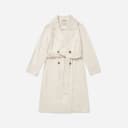
Four generations from the Genlook engine on real product photos.











03 — The real difference
More features, or more depth
OnYou, built by the team at Tolstoy, is a bundle: photo-based try-on, an AI assistant that chats with shoppers, size recommendations and upsell tools in one app. If you want one install to cover several jobs on the product page, that is a reasonable pitch, and its pricing sits within a dollar of Genlook's at every entry tier.
The question is where depth matters. A chatbot answers questions a shopper thinks to ask. The try-on answers the one they rarely type: "would this actually look good on me?"
How Genlook handles it
Genlook spends its entire budget on that one answer. The flow from button to result is A/B tested against add-to-cart rate, generations land in 9.3 seconds median, and the widget renders in the shopper's own language, more than 50 covered, where OnYou ships in English. Around the core sit the pieces that turn try-ons into revenue you can trace: configurable email capture, Klaviyo and Shopify Flow integrations, and funnel analytics from impression to add-to-cart.
The public track record is part of the comparison too: Genlook holds 5.0 stars with the Built for Shopify badge, while OnYou sits at 3.6 stars without it. Both apps are young; the reviews are worth reading either way.
04 — In practice
What Genlook is tuned for.
Add-to-cart
The widget flow ends at the cart. Each step is A/B tested against add-to-cart rate.
Email capture
The email ask appears during the try-on. You choose when it triggers and what it says.
Every shopper's language
The widget detects each shopper's language and renders in it, with more than 50 languages covered. No setup.
Funnel analytics
Impressions, opens, uploads, generations and add-to-cart events, reported in the dashboard.
05 — Switching
From OnYou to Genlook, step by step.
Install Genlook
From the Shopify App Store. The free plan needs no card.
Swap the app embeds
In the theme editor, turn OnYou's embed off and Genlook's on. No code changes.
Check the funnel
Try-ons, captured emails and add-to-cart events report from the first session.
06 — Genlook Pricing
Monthly plans with try-ons included.
The Free plan includes 10 try-ons a month and needs no card. Paid plans include more try-ons, and extra ones are billed individually.
FREE
$0
10 try-ons / month
no extra usage on the Free plan
- –10 monthly try-on included
- –Customizable try-on widget
STARTER
$19.99
/mo100 try-ons / month
+ $0.17 per extra try-on
- –100 monthly try-on included
- –Additional try-ons at $0.17/tryon
- –Analytics Dashboard
- –Customers Email Collection
- –Standard Support
GROWTH
MOST POPULAR$29
/mo250 try-ons / month
+ $0.12 per extra try-on
- –250 monthly try-on included
- –Additional try-ons at $0.12/tryon
- –Advanced Analytics
- –Customers Email Collection
- –Standard Support
PRO
$99
/mo1,000 try-ons / month
+ $0.10 per extra try-on
- –1000 monthly generations included
- –Additional try-ons at $0.10/tryon
- –Advanced Analytics
- –Customers Email Collection
- –Remove genlook branding
- –VIP Support
Used by 900+ fashion stores
★★★★★5.0on the Shopify App Store







07 — FAQ
Questions, answered.
Pricing looks the same. What actually differs?↓
The core try-on plans are within a dollar of each other, and both apps capture emails. The differences are around the edges: Genlook renders in 50+ languages, integrates with Klaviyo and Shopify Flow, charges less per extra try-on, and carries a 5.0 rating with the Built for Shopify badge. OnYou adds a chat assistant and size recommendations that Genlook does not have.
Does Genlook have a shopping assistant like OnYou?↓
No, by design. Genlook focuses on the visual moment: the shopper sees the garment on themselves and decides. If a product-page chatbot is a priority for your store, OnYou bundles one; Genlook keeps the widget focused on the try-on.
Does Genlook recommend sizes?↓
Not yet. An AI size chart is coming. Today Genlook answers the "how does it look?" question; OnYou includes measurement-based size recommendations alongside its try-on.
Can I compare Genlook and OnYou before deciding?↓
Yes. Duplicate your theme, enable Genlook's embed on the preview, and compare it against OnYou on your live theme. Both free plans make the test free.
Will the widget slow my product pages?↓
No. Genlook loads after your page renders and adds nothing to your theme code, so your Core Web Vitals stay where they are.
Further reading
What is virtual try-on? →ROI calculator →Try it on your own products.
Install Genlook free on your Shopify store and compare it with your current setup on a theme preview.