
 Shopify
 WooCommerce
 API
APIQwen-Image-2.1 for Virtual Try-On: Test Results
Alibaba open-sourced Qwen-Image-2.1 on September 20, 2026. We ran it on eight try-on pairs next to Google's Vertex AI virtual try-on model. Results, cost, and the licence catch.
Table of contents
On September 20, 2026, the Qwen team at Alibaba open-sourced Qwen-Image-2.1. It is a 7B image model that generates and edits in one pipeline, takes up to 10 reference images, and names virtual try-on as a target use case.
We tested it on the eight person-and-garment pairs we use for every engine, next to Google's virtual try-on model on Vertex AI, one of the most common commercial options. Same photos, same prompt pipeline, no fine-tuning.
What is Qwen-Image-2.1?
Qwen-Image-2.1 replaces three earlier models (Qwen-Image for generation, Qwen-Image-Edit for editing, Qwen-Image-Layered for transparency) with one checkpoint.
- 7B parameters in the generation component (32 single-stream DiT layers). Qwen3-VL 8B reads the prompt and the input images.
- Up to 10 reference images in one edit. From the release page: "for virtual try-on, five inputs (a model, clothing, shoes, a bag, and a hat) can be combined into a complete outfit."
- Region editing. Circle an area, paint over it, or pass a separate mask, and only that region changes.
- Fidelity for people and products is a stated training goal: faces stay the same across edits, product "text, textures, and shape" are preserved.
- Native transparency. RGBA output from a prompt, and subject extraction from a photo as a transparent layer.
- Efficient inference. Input images and the instruction are encoded once and cached for every denoising step, so an edit with ten references costs about the same per step as one with a single reference.
On the team's own Qwen-Image-Bench it scores 60.28, seventh of 29 models. The six ahead of it are closed (GPT Image 2.5 leads at 67.01). Among open-weight models it is first by a wide margin.
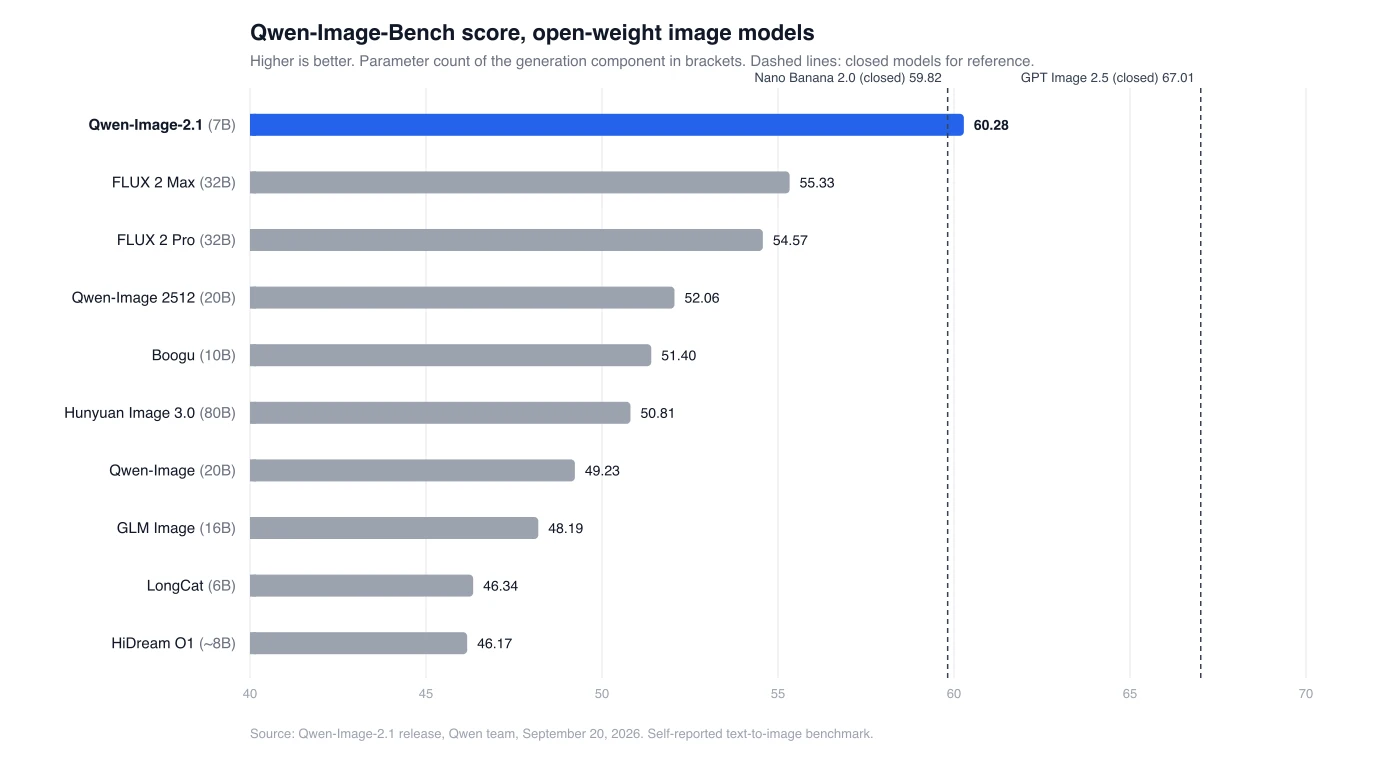
This is a self-reported benchmark and it measures generation, not editing. Weights are on Hugging Face and ModelScope, with day-zero support in Diffusers, ComfyUI, vLLM-Omni and SGLang.
The licence is the Qwen Research License, "for non-commercial purposes only". Commercial use needs a separate agreement with Alibaba. More below.
Does it work for virtual try-on?
Yes, zero-shot.
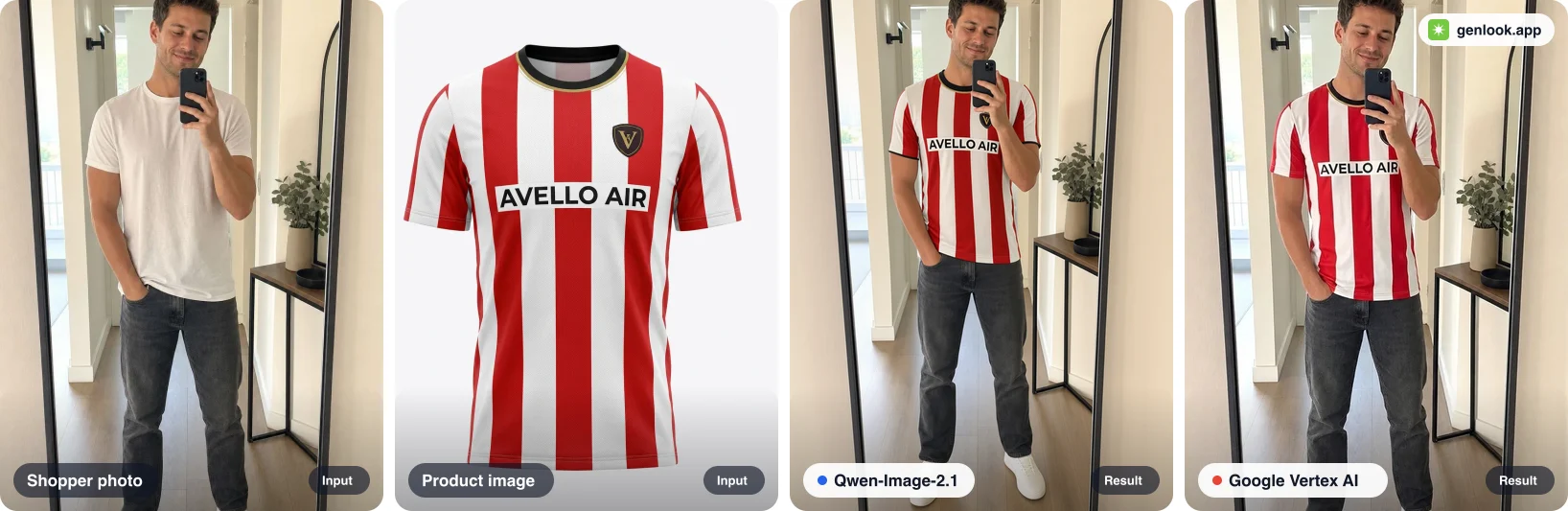
Setup: eight pairs from our public try-on examples, each a mirror selfie plus the product image as a merchant would upload it (a flat packshot or an on-model photo). Qwen-Image-2.1 ran on Comfy Cloud at 16 steps. Vertex AI ran through its API. Both went through the same prompt pipeline, with no LoRA and no post-processing. Each panel reads left to right: shopper photo, product image, Qwen-Image-2.1, Google Vertex AI.
The football shirt at the top of the post is the text test. Both models keep the sponsor wordmark and the crest legible and in place, and neither changes the shopper's hands, phone or background.
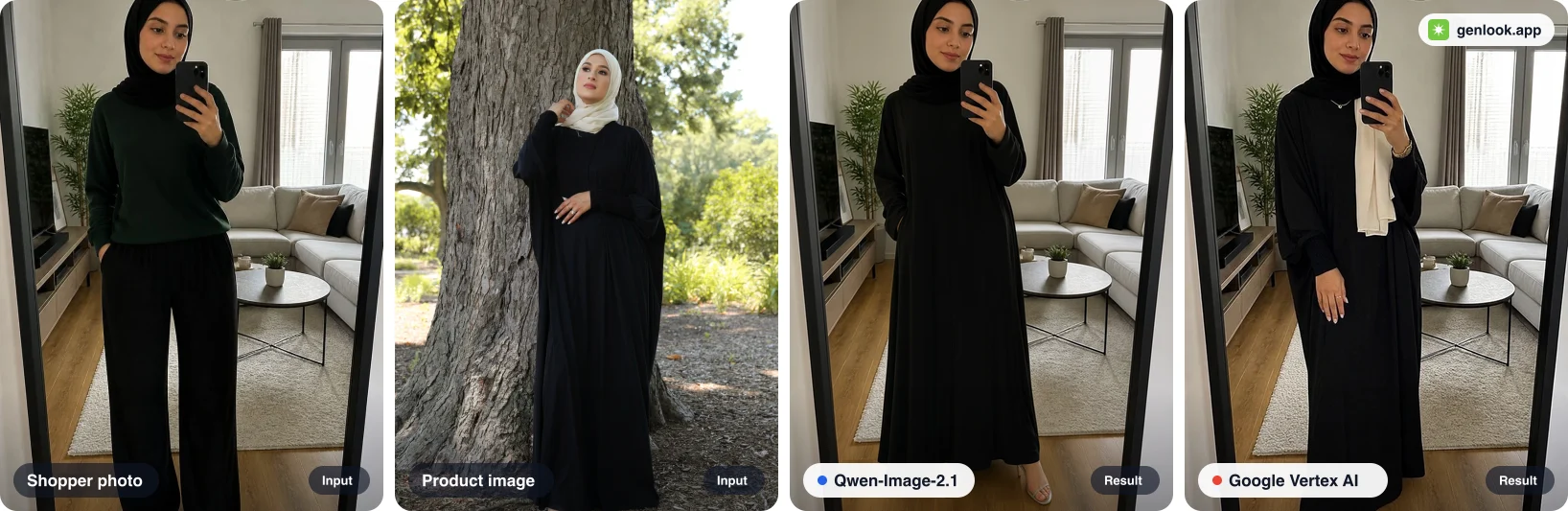
Where Qwen does better. The abaya is photographed on a model wearing a cream scarf. Vertex carried the scarf over with the garment. Qwen changed the abaya and nothing else.
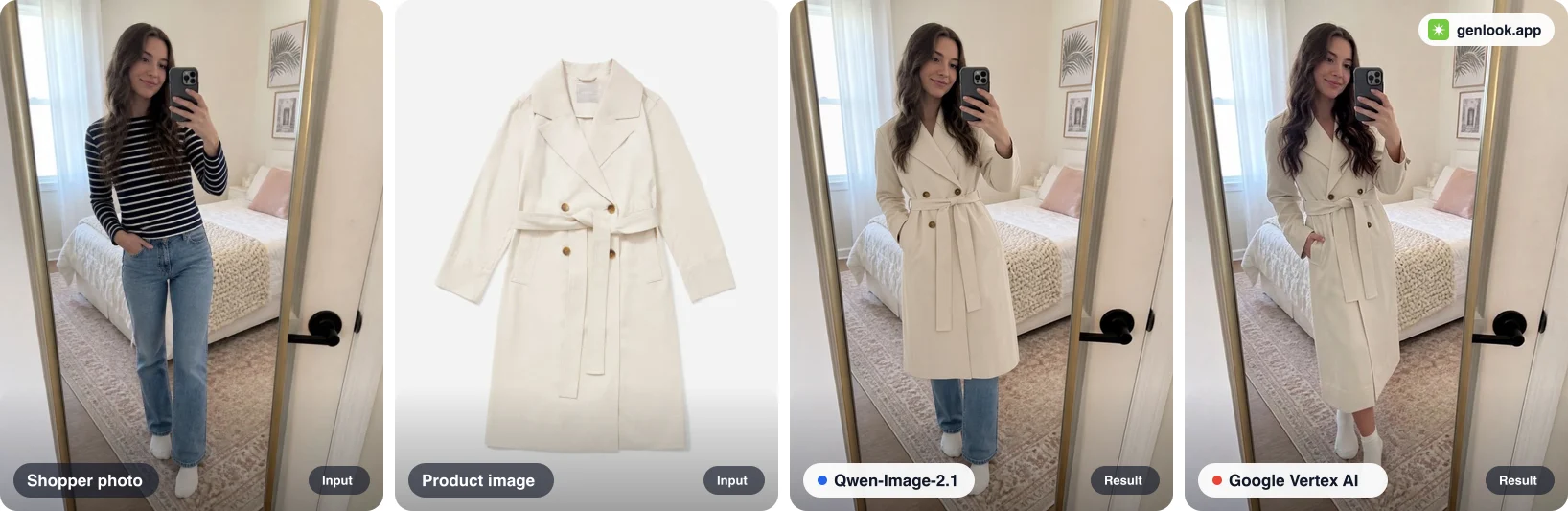
Where Qwen does worse. The packshot is mid-calf. Vertex keeps that length, Qwen stops at the knee. Belt, closure and lapels are right on both. Hem length on long garments was the one consistent miss, and it showed up again on a tiered maxi dress.
The other five pairs (a floral midi, a neon hoodie, a two-piece saree, a plus-size maxi, a lace wedding gown) we could not separate. Both carried the saree's blouse and border, both got the print scale right on the midi, neither altered a face.
Qwen-Image-2.1 vs Google Vertex AI try-on
| Qwen-Image-2.1 on Comfy Cloud | Google Vertex AI virtual try-on | |
|---|---|---|
| Pairs completed | 8 of 8 | 8 of 8 |
| Median time per try-on | 9.9 s | 9.3 s |
| Cost per try-on | about $0.005 (GPU time) | $0.06 (list price) |
| Quality, side by side | 6 ties, 1 better, 1 worse | 6 ties, 1 better, 1 worse |
| Weights | open, can be fine-tuned | closed API |
| Licence | research only, commercial by agreement | commercial |
Qwen's time includes about three seconds of queueing on Comfy Cloud. The Qwen cost is GPU time for the model alone; a full try-on request also runs garment classification, prompt construction and quality checks.
The catch
Licence. Qwen-Image-2.1 ships under the Qwen Research License Agreement, not Apache 2.0 like Qwen-Image-Edit-2511. The licence file grants use "for non-commercial purposes only", defined as research or evaluation, and directs commercial users to request a licence from Alibaba. A try-on button on a store is commercial use. Self-hosting needs that agreement.
The two misses. Hem length on long garments, and dropped secondary pieces on some multi-part products. Both are systematic, which is what a LoRA is for. At 7B an adapter trains on a single GPU in hours. ModelScope's DiffSynth-Studio supports LoRA training on 2.1 from day one and ComfyUI loads adapters through its standard nodes. Training data is an on-model photo paired with the matching packshot, which fashion catalogues already have. A prompt that names the garment category, closure and length fixes most of the hem misses on its own; a LoRA covers the rest.
What this means for Genlook
Qwen-Image-2.1 is the first open model to reach parity with a commercial try-on API on our pairs, at a fraction of the cost per image. We are upgrading the Genlook try-on pipeline to use it where it is stronger, on top of the garment classification, prompt construction and quality checks that sit around any model, so that every product type gets the best try-on quality available. The two misses above are the first things the pipeline work targets.
For developers, the Genlook Try-On API is one endpoint for every product type. One credit is one try-on: $0.04 pay as you go, or from $0.015 on a monthly plan. Pack credits never expire, and new accounts start with free credits. The quickstart is four calls: create a product, upload a photo, generate, fetch the result.
Summary
- The release: a 7B open-weight model that generates, edits with up to 10 references, and handles transparency in one checkpoint. Best open model on the team's benchmark.
- On try-on: matches Google's Vertex AI model on 6 of 8 pairs zero-shot. Better at leaving non-garment items alone, worse on hem length for long garments.
- Cost: about $0.005 of GPU time per image versus $0.06.
- The catch: a research-only licence for self-hosters, and two misses a LoRA should fix.
Get an API key at platform.genlook.app to use the Genlook Try-On API, or add virtual try-on to your store.
FAQ
Questions, answered.
Can Qwen-Image-2.1 do virtual try-on?↓
Yes. The release shows an outfit assembled from five reference images (a model, clothing, shoes, a bag and a hat). On our eight benchmark pairs it matched Google's Vertex AI try-on model on six zero-shot, with one better and one worse.
Is Qwen-Image-2.1 free to use commercially?↓
No. It is released under the Qwen Research License Agreement, which limits use to non-commercial research or evaluation and requires a separate commercial licence from Alibaba. Qwen-Image-Edit-2511 is Apache 2.0.
How does Qwen-Image-2.1 compare to Google Vertex AI virtual try-on?↓
In our run: 9.9 s versus 9.3 s median, 8 of 8 completed each, six ties out of eight on quality, and about $0.005 of GPU time per image against Vertex's $0.06 list price. Vertex is a commercial API; Qwen is open weights under a research licence.
Can you fine-tune Qwen-Image-2.1 with a LoRA?↓
Yes. DiffSynth-Studio on ModelScope supports LoRA training for Qwen-Image-2.1 and ComfyUI loads adapters through its standard LoRA nodes. At 7B parameters an adapter trains on a single GPU.
How much does the Genlook Try-On API cost?↓
One credit is one try-on. Credits cost $0.04 pay as you go, or from $0.015 on a monthly plan: Starter is $20 for 1,000 try-ons, Growth is $99 for 6,000, Scale is $300 for 20,000. Pack credits never expire and new accounts start with free credits.